
How to Create AI Voiceovers for Pinterest Videos with ElevenLabs
Creating voiceovers for Pinterest videos no longer requires a microphone, recording equipment, or hours of editing. With AI voice tools like ElevenLabs, you can turn a simple script into natural-sounding audio in minutes — making it easier to create engaging video Pins, promote digital products, and produce content consistently.
Why Use AI Voiceovers for Pinterest?
Pinterest is a visual discovery platform, but video Pins can become even more engaging when you add clear narration. AI voiceovers let you create audio without recording your own voice, which can be especially useful when producing multiple Pins or repurposing content for different campaigns.
AI voiceovers can help you:
- Create narration without recording your own voice
- Produce video Pins faster
- Turn blog posts and product ideas into short videos
- Test different scripts and content angles
- Repurpose the same content for Pinterest and other platforms
How to Create an AI Voiceover with ElevenLabs
ElevenLabs makes it possible to turn written text into natural-sounding speech in just a few steps. Here’s a simple workflow you can use to create a voiceover for a Pinterest video Pin.
Step 1: Write a Short Pinterest Video Script
Start with a short script focused on one clear idea. For a Pinterest video, you usually don’t need a long narration. A strong hook, one useful takeaway, and a simple call to action are often enough.
Example script:
Looking for an easier way to create voiceovers for your Pinterest videos? AI can turn your text into natural-sounding speech in minutes. Here’s how to do it with ElevenLabs.
Step 2: Generate Your AI Voiceover with ElevenLabs
Open ElevenLabs Text to Speech and paste your script into the text box. Choose a voice that fits the style of your Pinterest video. For this example, we used Adam – Engaging, Friendly and Bright.
If the narration sounds too fast, adjust the Speed setting before generating it again. We found that reducing the speed to around 0.90 made the voiceover easier to follow.
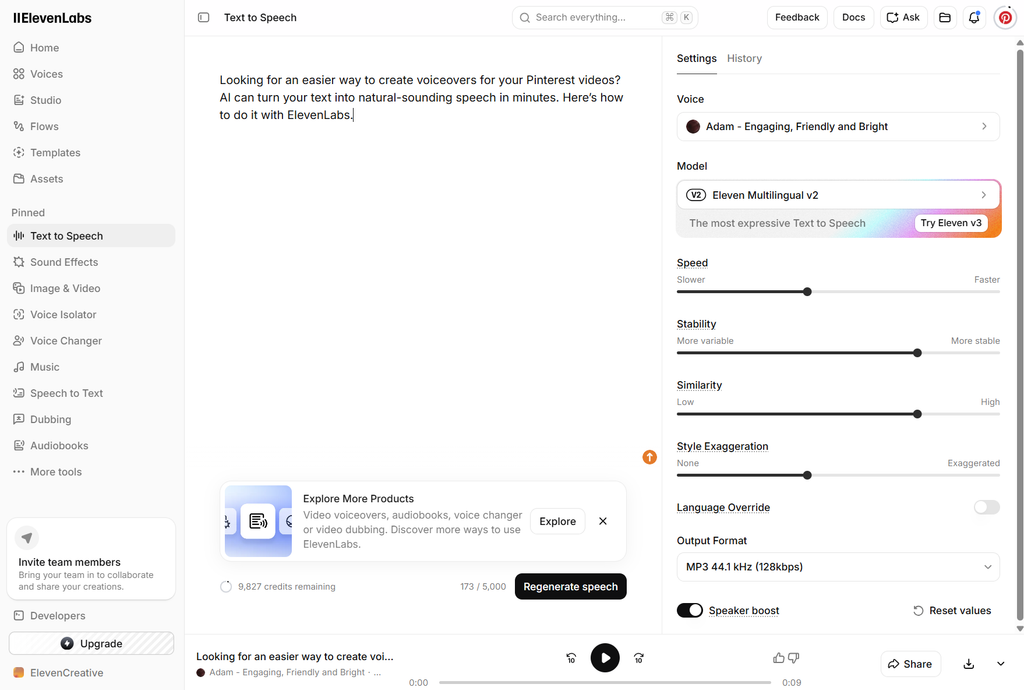
ElevenLabs Text to Speech settings used to create an AI voiceover for a Pinterest video.
Step 3: Download Your AI Voiceover
Once you’re happy with the result, download the generated audio file from ElevenLabs. You can then add the voiceover to your Pinterest video using your preferred video editor.
For this example, the voiceover was generated as an MP3 file, ready to be added to a video Pin.
How to Use Your AI Voiceover in a Pinterest Video
Once your voiceover is ready, combine it with a simple vertical video, product demo, screen recording, or animated graphic. Keep the visuals clear and make sure the most important message is easy to understand even when the viewer is scrolling quickly.
Add on-screen text or captions to reinforce the narration, then use the AI voiceover as the audio track. This gives you a simple workflow for turning one idea into a Pinterest-ready video without recording your own voice.
Quick Tips for Pinterest Video Voiceovers
Keep your script focused on one clear idea. Start with a strong hook in the first few seconds. Use captions because many people may watch without sound. Match the voice style to the topic and visual mood. Keep the narration clear and avoid speaking too quickly. End with a simple call to action.
- Keep your script focused on one clear idea.
- Start with a strong hook in the first few seconds.
- Use captions because many people may watch without sound.
- Match the voice style to the topic and visual mood.
- Keep the narration clear and avoid speaking too quickly.
- End with a simple call to action.
Disclosure: This article contains an affiliate link. If you sign up through our link, Ucan2Hub may earn a commission at no extra cost to you.
Ready to create your own AI voiceover? Try ElevenLabs and turn your next Pinterest video script into natural-sounding speech.
Final Thoughts
AI voiceovers can make Pinterest video creation faster and more accessible, especially if you don’t want to record your own narration. Start with a short script, choose a voice that matches your content, adjust the pacing, and keep the final video simple and easy to understand.
The best approach is to experiment. Try different hooks, voices, and video styles to see what works best for your audience.
